Hubs on Subdirectories
Learn how to host a Hushly Hub on a subdirectory of your existing website domain.
This guide assumes you are familiar with domains and know how to set one up in Hushly. For more information, see Managing and Adding a Domain.
A Hub hosted on a subdirectory is published under a specific path within your organization’s existing domain rather than a separate subdomain. The subdirectory can be located at any level within your website’s directory structure. For example: www.yourdomain.com/resources/playbooks. Hosting Content Hubs on subdirectories helps consolidate SEO authority under your root domain.
Hosting your Hub on a subdirectory requires additional technical configuration and is considered an advanced hosting option that requires reverse proxy capabilities on your web server.
Hushly provides the Base Path option to define the subdirectory where the Hub is available. The reverse proxy uses this path to route requests from your domain to the Hushly hosting server.
What Does a Reverse Proxy Do?
A reverse proxy acts as an intermediary between your website and the Hushly Hub. It receives requests from visitors and forwards them to the appropriate destination, allowing you to host a Hub on a subdirectory of your existing website.
For example, you can make your Hub available at: www.yourdomain.com/resources
without requiring the Hub to be hosted directly on your website's infrastructure.
How hosting a Hub on Subdirectory Works
When a visitor accesses a Hub hosted on a subdirectory, the request follows this general flow: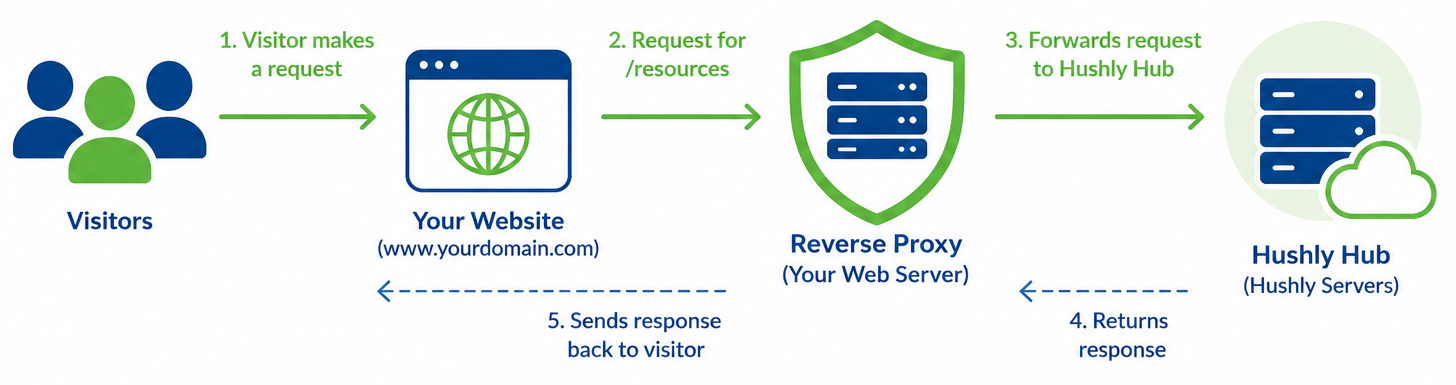
- A visitor enters the Hub URL in their browser, for example: www.yourdomain.com/resources.
- Your web server receives the request.
- The reverse proxy identifies the /resources path.
- The reverse proxy forwards the request to the Hushly Hub.
- Hushly processes the request and returns the Hub content.
- The reverse proxy sends the response back to the visitor.
From the visitor's perspective, the Hub appears to be part of your website because the Hub URL uses your existing domain and subdirectory.
Why Use a Reverse Proxy for a Hub?
A reverse proxy allows you to:
- Host a Hub on your existing domain: Use a URL such as www.yourdomain.com/resources.
- Use a subdirectory: Serve the Hub from a specific path without creating a separate website.
- Maintain a consistent URL structure: Keep Hub content organized under your primary domain.
- Provide a seamless visitor experience: Visitors can access Hub content without being redirected to a different domain.
- Keep your existing website: Your website continues to handle its own URLs while the reverse proxy routes Hub requests to Hushly.
Note: The Reverse Proxy setup is owned, managed, and maintained by your organization’s IT team.
Reverse Proxy Requirements and Configuration
For setting up a Reverse Proxy, the requirements and configuration guidelines include:
- Configure the Hushly origin server: Select or create a dedicated subdirectory for routing requests to your Hushly origin server (hubs.hushly.com). The origin server hosts and delivers the Hub content.
- Configure reverse proxy rules: Create a rule that applies to all requests targeting the designated subdirectory of your root domain and forwards them to the Hushly origin server (hubs.hushly.com). The reverse proxy must support and forward requests using the following HTTP methods:
- GET
- POST
- HEAD
- OPTIONS
- PATCH
Note: To ensure full Hub functionality, your reverse proxy must support and forward requests using the required HTTP methods listed above. Requests using other HTTP methods can also be forwarded safely.
- GET
- Preserve the original request: Ensure that requests are passed to the Hushly origin server without modification. The reverse proxy and its rules must preserve the original request, including the URL path, query parameters, HTTP method, headers, and request body. This ensures that the origin server can accurately deliver content and track visitor activity within your Hushly instance.
- Enable TLS (Transport Layer Security): Establish a secure HTTPS connection between the reverse proxy and the Hushly origin server. The TLS connection terminates at the origin server and is secured using Hushly's certificate, so you do not need to configure a separate certificate. TLS encrypts requests and responses transmitted between the reverse proxy and the origin server, helping protect data from interception or modification.
- Disable origin server caching: Disable caching of responses from the Hushly origin server at the reverse proxy or CDN layer. This helps ensure that the latest content is delivered accurately and that visitor-specific content and activity are processed correctly.
Related Articles:
Was this article helpful?
That’s Great!
Thank you for your feedback
Sorry! We couldn't be helpful
Thank you for your feedback
Feedback sent
We appreciate your effort and will try to fix the article