Hubs on Subdomains
Learn how to host a Hushly Hub on a subdomain of your existing website domain.
This guide assumes you are familiar with domains and know how to set one up in Hushly. For more information, see Managing and Adding a Domain.
A domain is the web address used to host your Hushly Hub or Experience. A subdomain is an extension of your primary domain that provides a dedicated web address for specific content, such as resource centers, campaign pages, or ABM landing pages.
Hosting a Hub on a subdomain keeps it associated with your primary domain while making it accessible through a dedicated URL.
Example:
Primary domain: yourcompany.com
Hub subdomain: resources.yourcompany.com
Your primary domain is established when a Hushly administrator creates your organization's account.
How Hosting a Hub on a Subdomain Works
When a visitor accesses a Hub hosted on a subdomain, the request follows this general flow: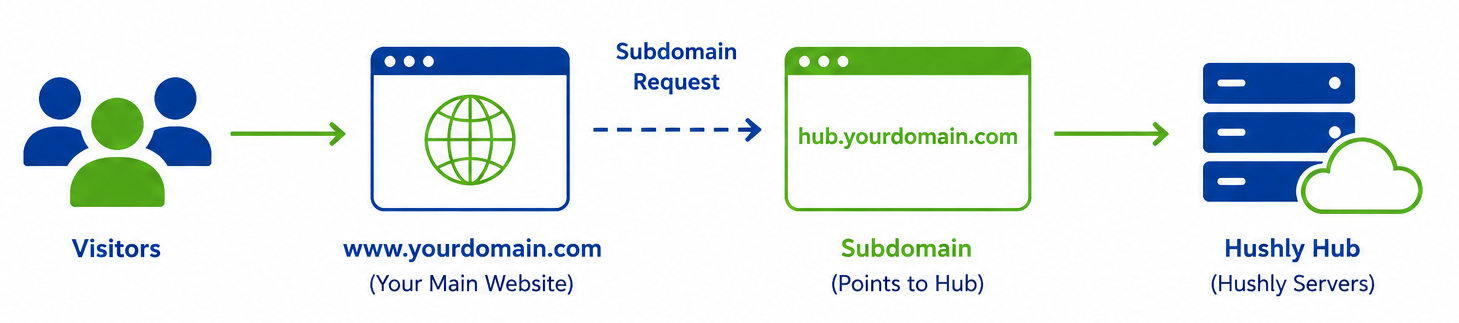
- A visitor enters the Hub's subdomain URL, such as "hub.yourdomain.com".
- The DNS configuration for the subdomain directs the request to the Hub.
- The request is routed to the Hushly Hub.
- The Hub is displayed to the visitor using your subdomain.
Unlike hosting a Hub on a subdirectory, hosting it on a subdomain does not require the Hub to be placed under a path such as "/resources".
Note: Hosting a Hub on a subdomain requires you to configure a DNS CNAME record for the subdomain. For more information, see Manage and Add a Domain.
Using a Subdomain with Hushly
Most organizations host their resource center on a dedicated subdomain, such as resources.companyname.com. To do this, create a CNAME record in your Domain Name System (DNS) that points the subdomain to Hushly's hosting environment.
A CNAME record acts as an alias, mapping your custom subdomain to Hushly's hosting infrastructure. Visitors access your Hub using your branded URL (for example, resources.companyname.com), while Hushly securely hosts and serves the content in the background.
Setup Process
Follow these steps to configure your Resource Center:
- Choose a Subdomain
Choose a subdomain that visitors will use to access your content, such as: resources.companyname.com. This will be added to Hushly under Manage Domains.
- Point the Subdomain to Hushly
Hushly hosts your resource center at: hubs.hushly.com
Create a DNS CNAME record that points your subdomain to hubs.hushly.comExample:
Once configured, visitors accessing resources.companyname.com will be redirected to Hushly while remaining on your branded URL.
Configure SSL/TLS
Secure connections require SSL/TLS encryption. Although the industry standard is now TLS, the term SSL is still commonly used. Choose one of the following options:
Hushly-Managed SSL (Recommended)
If you choose a Hushly-managed certificate:- Hushly will provide a CNAME name and value pair.
- Add the additional DNS entry within 48 hours of receiving the information.
Self-Managed SSL
If you prefer to manage your own certificate:- Generate an SSL certificate for your subdomain (for example, resources.companyname.com).
- Send the certificate files to your Customer Success Manager or email them to support@hushly.com.
Related Articles:
Hosting a Hub on a Subdirectory
Was this article helpful?
That’s Great!
Thank you for your feedback
Sorry! We couldn't be helpful
Thank you for your feedback
Feedback sent
We appreciate your effort and will try to fix the article