The GEOSherpa Dashboard is an analytics interface that provides insights into how users interact with Answer Engine (AE)–driven content. It helps track traffic, engagement, and lead generation performance across GEO-enabled and non-GEO assets, enabling teams to measure effectiveness and optimize digital strategies.
There are three tabs on the GEOSherpa Dashboard page.
- Overview
- Pre/Post Analysis
- Coverage
Overview
To view the GEOSherpa Dashboard page, follow the steps below:
- From the Lef Nav Menu, expand GEOSherpa and click Dashboard.
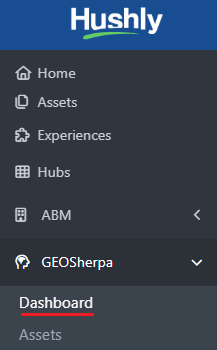
- The GEOSherpa Dashboard page is displayed with three tabs: Overview (default), Pre/Post Analysis, and Coverage.
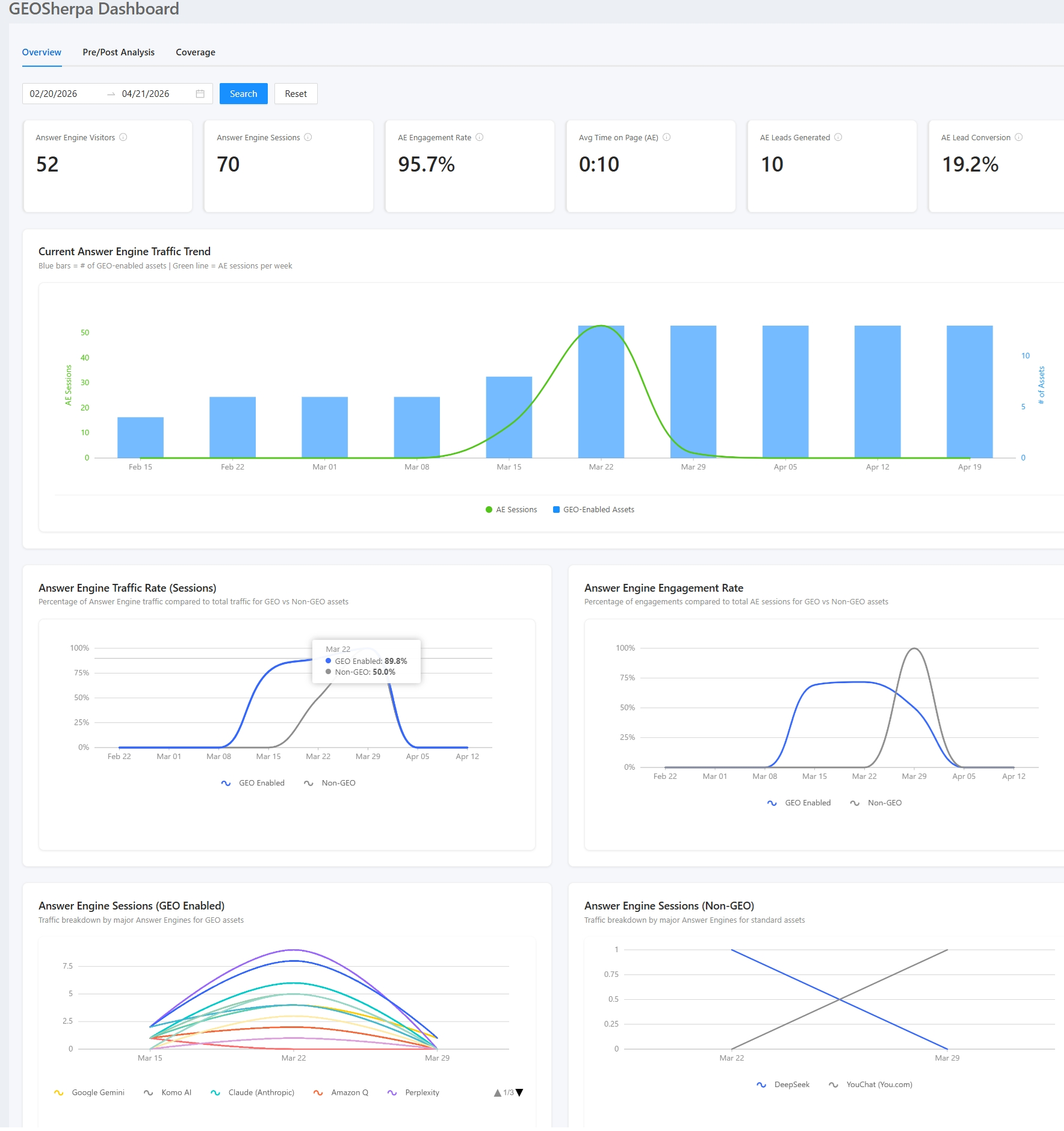 The Dashboard consists of the following sections:
- Summary Cards
- Current Answer Engine Traffic Trend
- Answer Engine Traffic Rate (Sessions)
- Answer Engine Engagement Rate
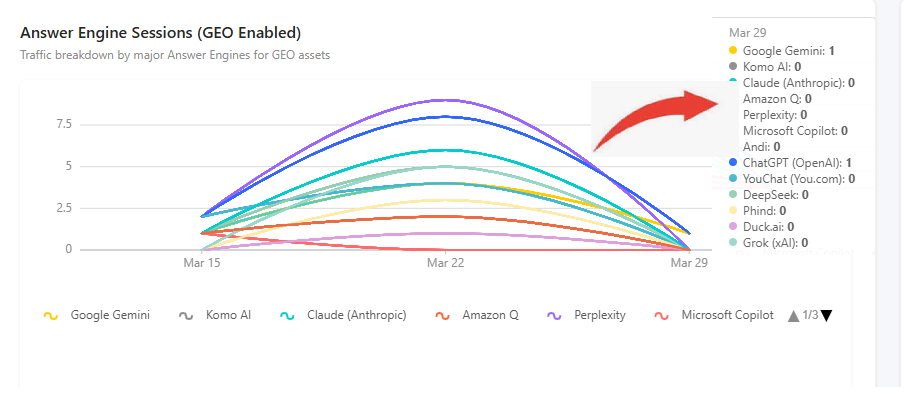
- Answer Engine Sessions (GEO Enabled)
- Answer Engine Sessions (Non-GEO)
Summary Cards: These provide a quick snapshot of performance.

- Answer Engine Visitors: Total number of unique users interacting with AE content.
- Answer Engine Sessions: Total sessions generated through the Answer Engine.
- AE Engagement Rate: Percentage of sessions where users actively engaged.
- Avg Time on Page: Average time users spend on AE-driven pages.
- AE Leads Generated: Number of leads captured via AE interactions.
- AE Lead Conversion: Percentage of sessions that converted into leads.
- Current Answer Engine Traffic Trend: Helps identify growth patterns and usage trends over time.
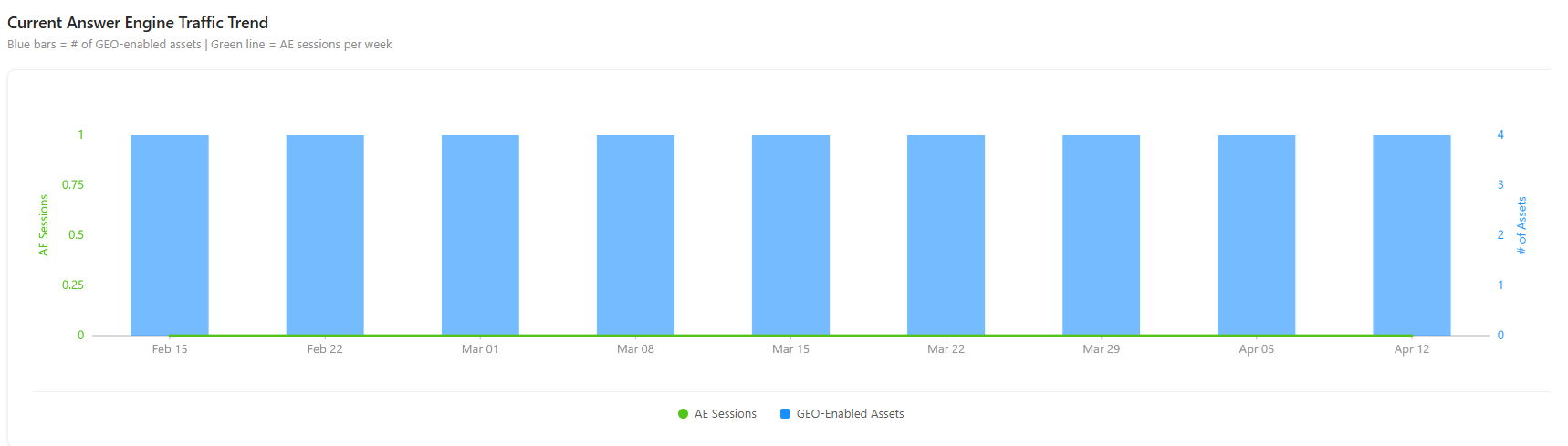 A bar graph showing weekly traffic trends.
- Blue bars → Number of GEO-enabled assets
- Green line → AE sessions per week
- Answer Engine Traffic Rate (Sessions): Useful for understanding AE impact vs traditional content. Shows the percentage contribution of AE traffic to overall sessions.
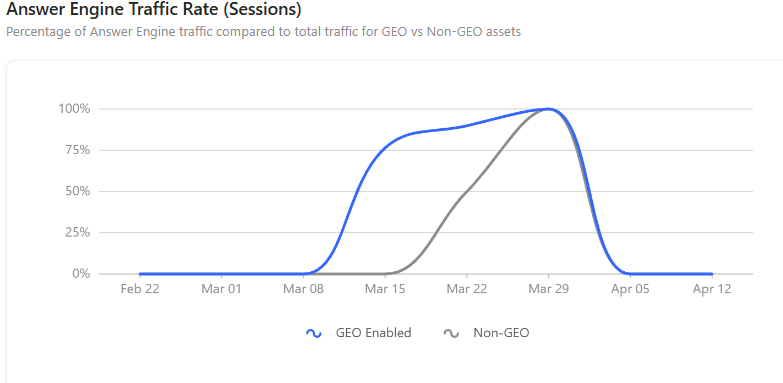 Line chart comparing:
- GEO-enabled traffic
- Non-GEO traffic
- Answer Engine Engagement Rate: Helps evaluate how engaging AE-driven experiences are compared to standard ones.
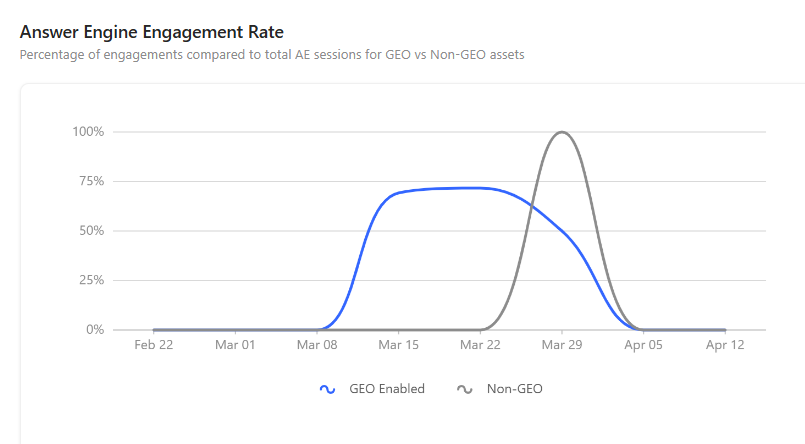 Displays engagement levels across:
- GEO-enabled sessions
- Non-GEO sessions
- Answer Engine Sessions (GEO Enabled): This section shows the traffic generated by GEO-enabled assets across different answer engines over time. The line chart compares performance by platform, helping users see which engines are driving engagement and how traffic trends evolve. Hovering over the chart provides detailed session counts for each engine on a specific date, enabling deeper performance insights.
- Answer Engine Sessions (Non-GEO): This section presents a line chart showing the traffic breakdown by major Answer Engines for non-GEO (standard) assets over a selected time period.
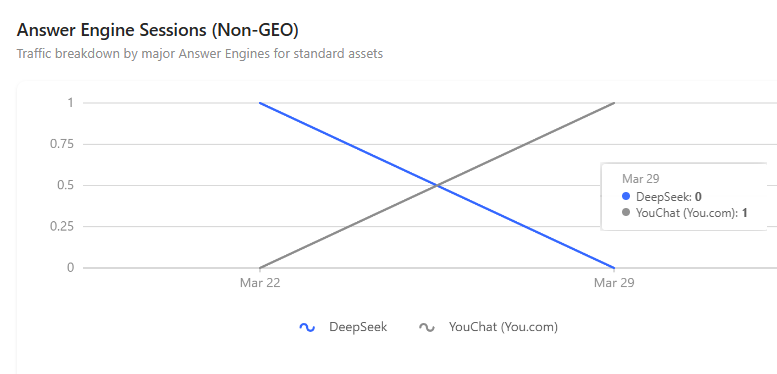 Tooltip Insight:
- DeepSeek: 0 session (Blue line)
- YouChat (You.com): 1 session (Gray line)
Pre/Post Analysis
The Pre/Post Analysis tab provides a comparative view of performance before and after GEO Sherpa enablement.
It analyzes Answer Engine metrics across a selected time window (e.g., 60 days before vs 60 days after) to measure the impact of GEO optimization on:
- Traffic (sessions)
- Engagement
- Lead generation
- Conversion performance
To view the Pre/Post Analysis on the GeoSherpa Dashboard, follow the steps below:
- On the GEOSherpa Dashboard page, click the Pre/Post Analysis tab, and the Pre/Post Analysis page is displayed.
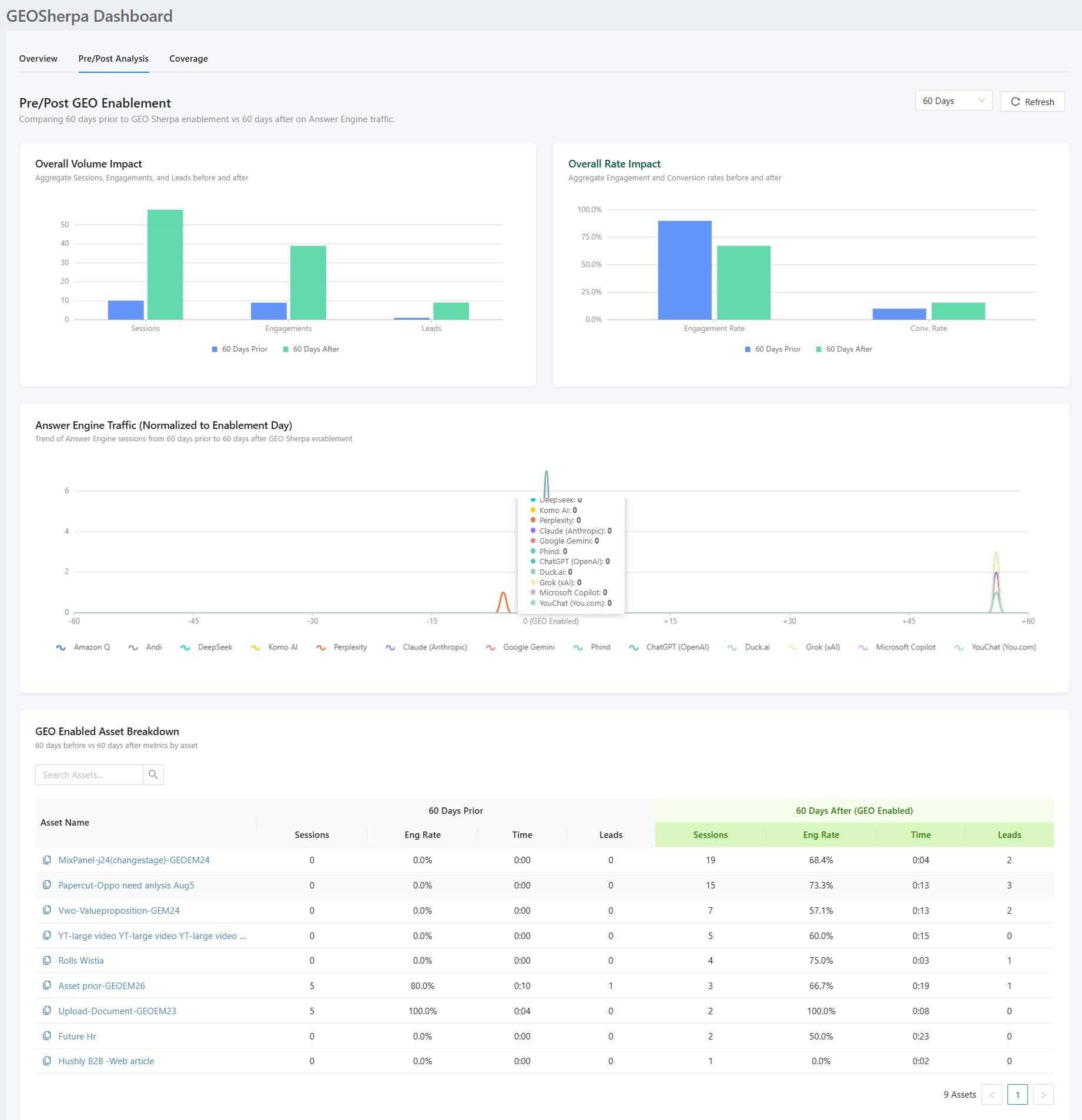 The Pre/Post Analysis displays the following sections.
- Overall Volume Impact
Overall Rate Impact
Answer Engine Traffic (Normalized to Enablement Day)
GEO Enabled Asset Breakdown
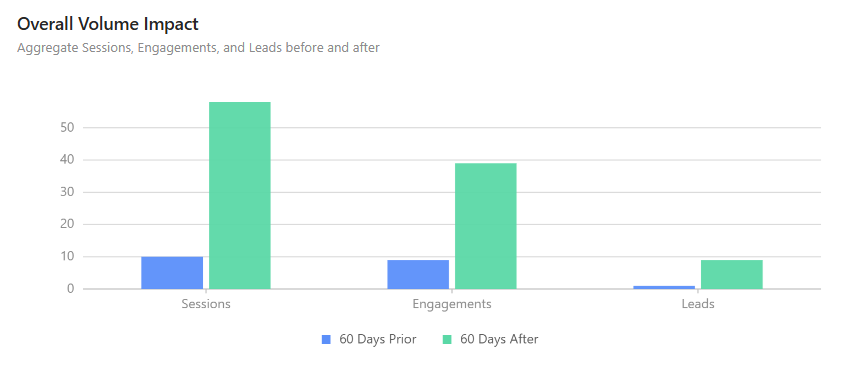
- Overall Volume Impact: A bar chart that compares absolute performance metrics before and after GEO enablement. It displays Sessions, Engagements, and Leads, helping to measure volume growth and determine whether GEO enablement has increased traffic and user interactions.
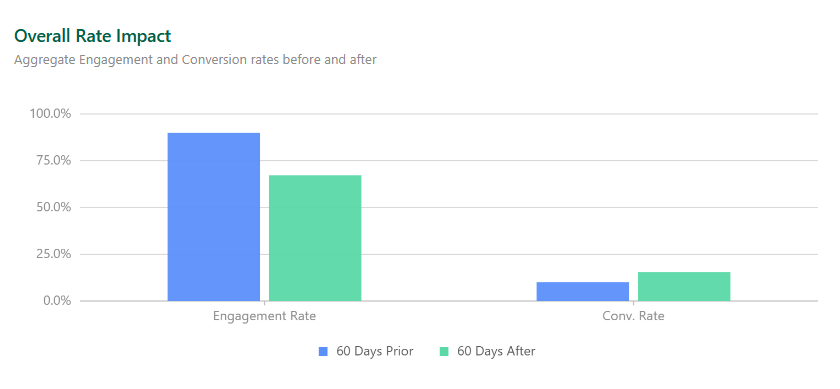
- Overall Rate Impact: A bar chart that compares percentage-based performance metrics before and after GEO enablement. It displays Engagement Rate and Conversion Rate, helping evaluate traffic quality and determine whether users are engaging with and converting more effectively.
- Answer Engine Traffic (Normalized to Enablement Day): A multi-line trend chart showing Answer Engine session activity from 60 days before to 60 days after GEO enablement, with Day 0 marking the enablement point. It helps track traffic trends, identify spikes around enablement, and compare contributions from different Answer Engine platforms.
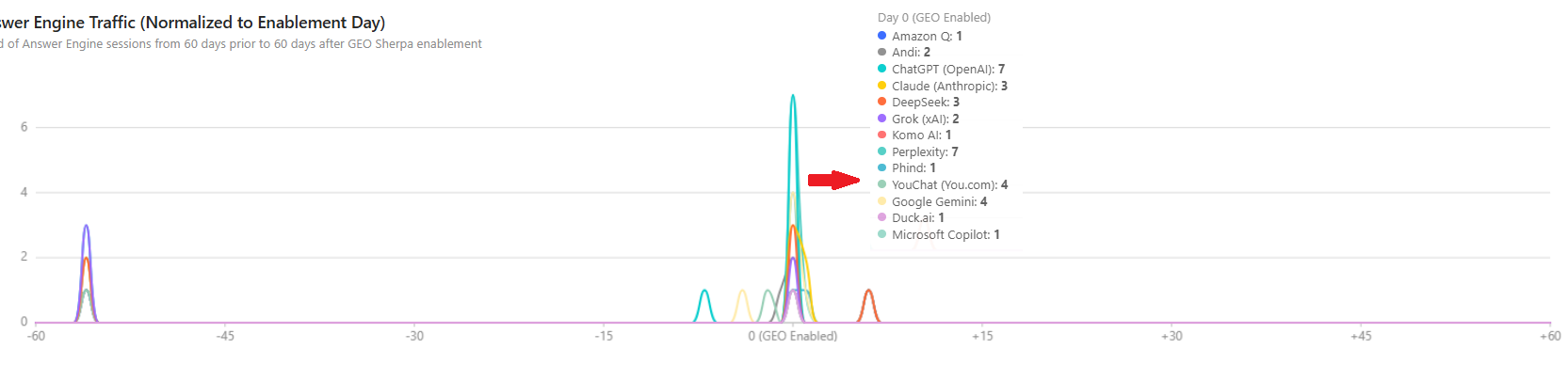 Tooltip Insight: Displays a platform-wise breakdown of Answer Engine sessions for the selected time point on hover.
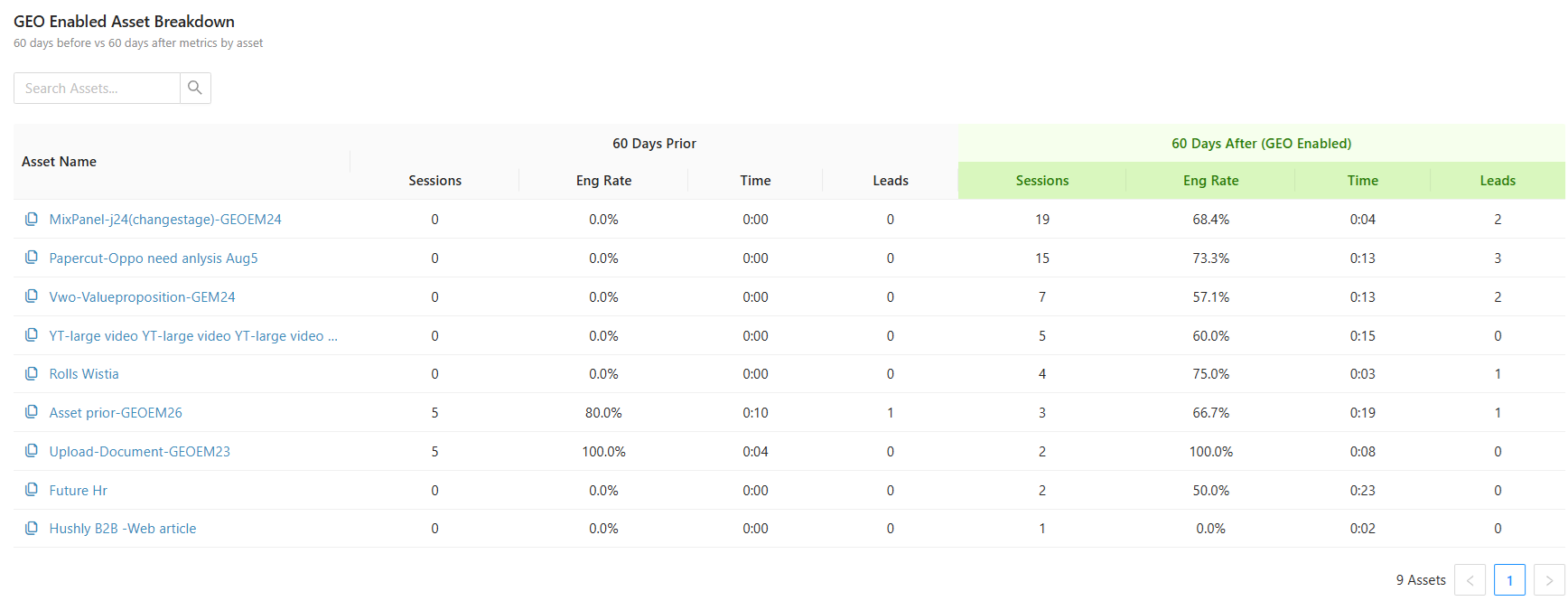
GEO Enabled Asset Breakdown:
A tabular view comparing individual asset performance before and after GEO enablement over a defined period (e.g., 60 days). It includes key metrics such as Sessions, Engagement Rate, Time Spent, and Leads for both periods, allowing users to evaluate performance changes at the asset level.
This section helps identify which assets have improved, highlight high-performing GEO-enabled content, and support data-driven optimization decisions. It also includes features like a search bar for filtering assets and pagination for easier navigation across multiple records.
Coverage
The Coverage tab in the GEO Sherpa Dashboard provides a focused view of how widely GEO-enabled assets are adopted across the content library. It highlights the proportion of GEO-enabled assets compared to standard (non-enabled) assets, helping users quickly assess overall enablement levels.
Within this tab, users can:
- View overall GEO coverage percentage to understand adoption at a glance.
- Compare total GEO-enabled assets with standard assets to identify gaps and opportunities.
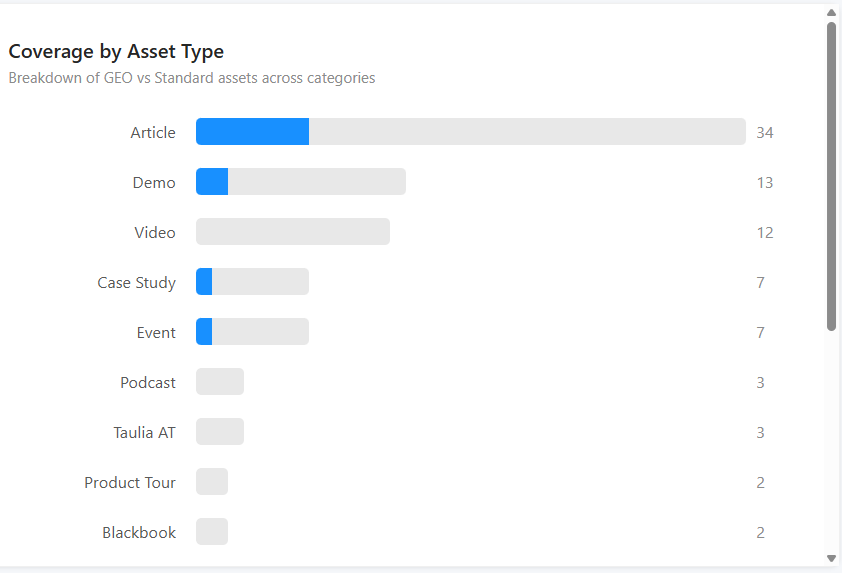
- Analyze coverage by asset type, showing which content categories have higher or lower GEO adoption.
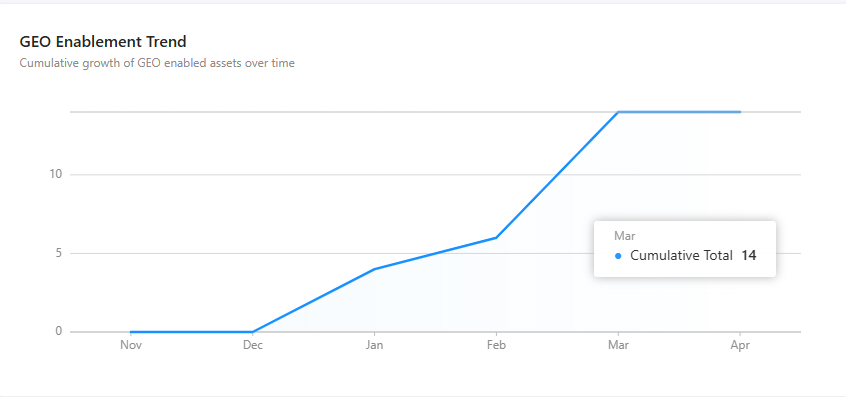
- Track GEO enablement trends over time to gain insight into growth and progress.
Overall, the Coverage tab helps users monitor adoption, identify areas for improvement, and measure how GEO enablement is evolving across their assets.
To view the Coverage on the GeoSherpa Dashboard, follow the steps below:
- On the GEOSherpa Dashboard page, click the Coverage tab, and the Coverage page is displayed.
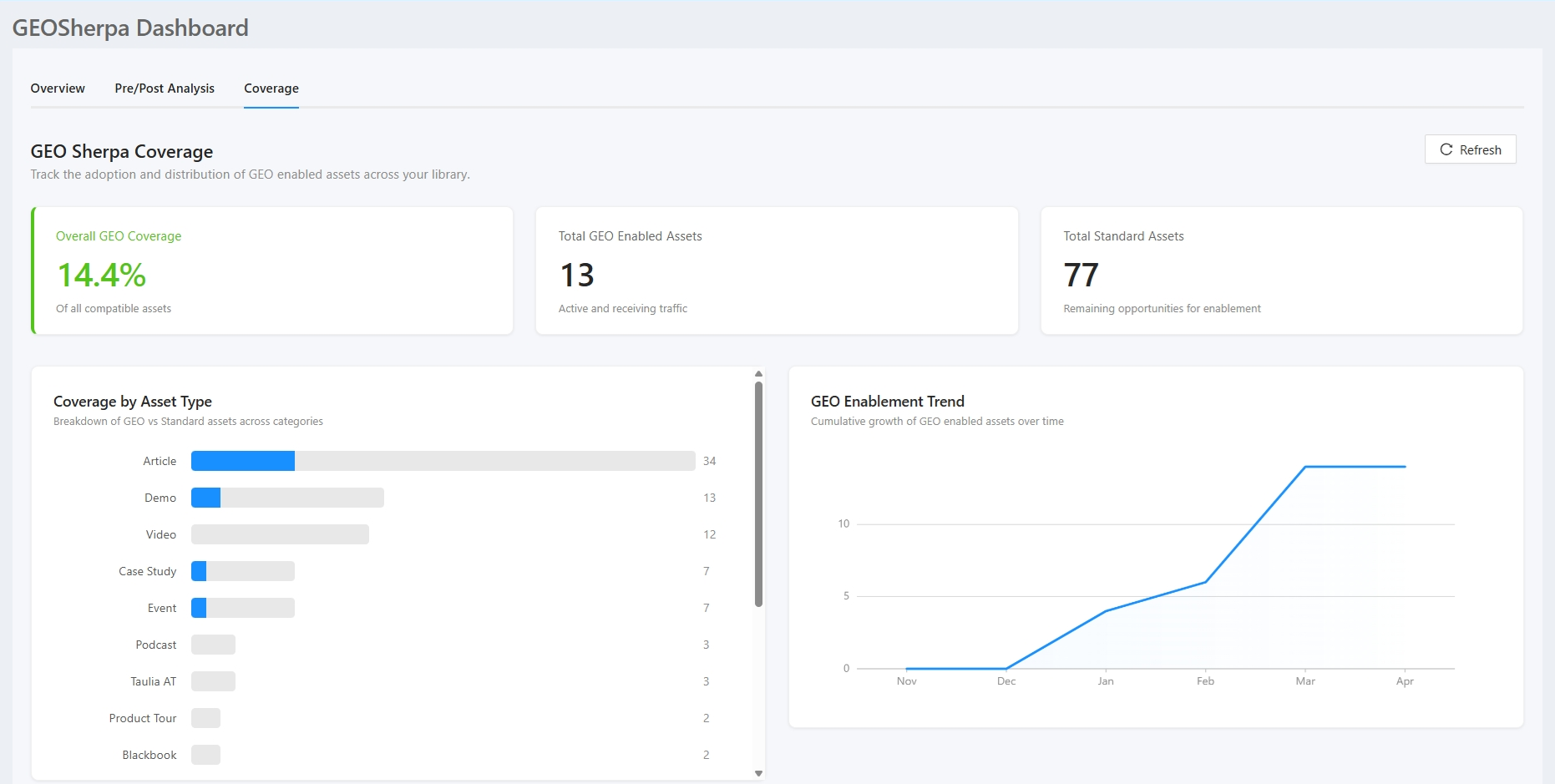 The Coverage tab displays the following sections:
GEOSherpa Coverage
Coverage by Asset Type
GEO Enablement Trend
- GEOSherpa Coverage: The GEO Sherpa Coverage section provides a summary of GEO enablement adoption across the asset library. It gives users a quick overview of how many compatible assets have been GEO-enabled, how many are currently active and receiving traffic, and how many standard assets remain available for enablement.

- Overall GEO Coverage shows the percentage of compatible assets that are GEO-enabled, helping users measure overall adoption progress.
- Total GEO Enabled Assets displays the number of assets currently enabled and active.
- Total Standard Assets indicates the number of remaining assets that have not yet been GEO-enabled, highlighting opportunities for further optimization.
- Coverage by Asset Type: This section shows a breakdown of GEO-enabled vs. standard assets across different content categories. Each bar represents an asset type, highlighting how many are GEO-enabled compared to the total. It helps quickly identify which content types have higher adoption and where more GEO enablement is needed.
- GEO Enablement Trend: This section displays the growth of GEO-enabled assets over time using a line chart. It shows how adoption has progressed across months, helping users track momentum and measure overall enablement trends.
Related Topics:
GEOSherpa
Was this article helpful?
That’s Great!
Thank you for your feedback
Sorry! We couldn't be helpful
Thank you for your feedback
Feedback sent
We appreciate your effort and will try to fix the article